
How to do an APollOW count
It takes just fifteen minutes in the fresh air!
Here’s how to do a Flower-Insect-Timed count in April to September for the APollOW project. (Click on each of the steps for more information.)
1. You’ll need the FIT count app, or a printed-out form and a way to time ten minutes
The easiest way to do a count is on your mobile phone. Download the app here: https://ukpoms.org.uk/fit-count-app. But you can also download a form (when you have done a few counts you probably won’t need a fresh form every time to remind you which details to record, just a notebook.)
2. and a way to measure a 50cm x 50cm square (a “quadrat”)
You could make one with stiff cardboard, wire, or 50cm lengths of cane etc, or with a 2-metre loop of string, knots tied every 50cm. Or with folded gaffer tape:

Or if you don’t have a ruler with you, you can measure with your foot or phone:
- If you know your shoe size, then you can easily convert it into a measure and pace out your quadrat. At size 10.5, I know that my quadrat is 2.5 x 2.5 shoes.
- Or, if you are going to be recording on your phone, how many phone lengths equals 50cm.
- If you are measuring a quadrat vertically, say if you have a vertical face of a hawthorn hedge, then you might need some other method.
We are not looking for outright precision here – just make sure your quadrat is about right within the nearest few cm.
3. Pick a dry day, not too cold
(Above 13 degrees if clear, above 15 degrees if sky half or more cloudy – but don’t get hung up on the exact figures.)
4. Go to one of the recording stations in the village which has some flowers out at the moment. Or you can just go into your garden
The stars refer to approximate areas, rather than specific points, for example, anywhere along the Longstanton Road verge where ragwort or other flowers are growing would be acceptable. As well as these ‘stations’, we want records from any place of your choice, especially gardens.
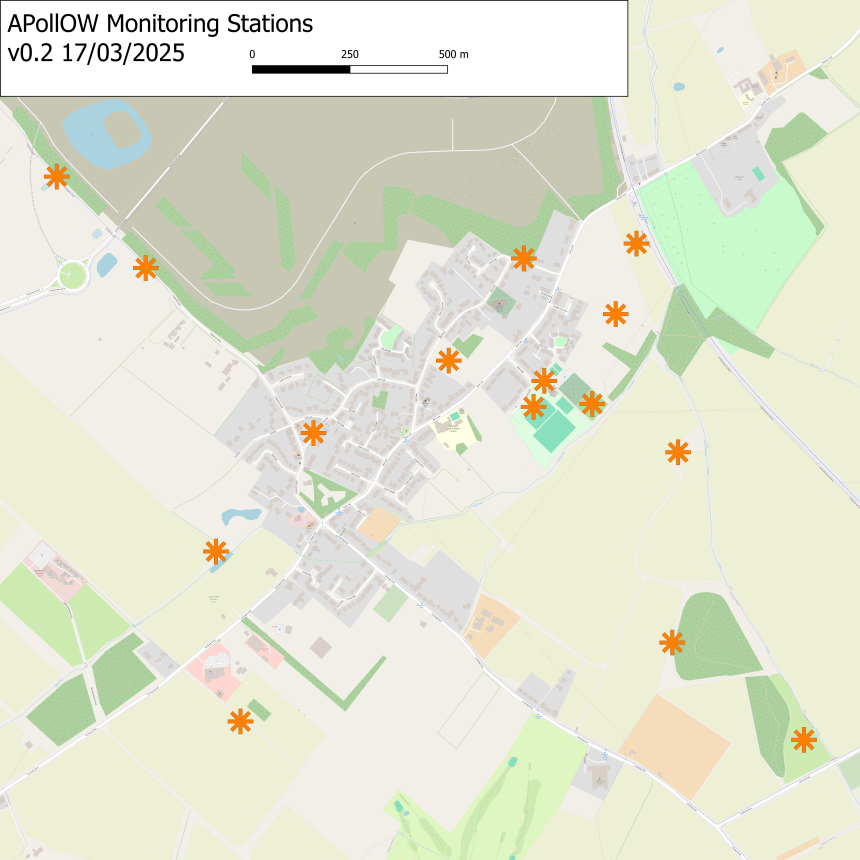
For each station or location, we’d love at least one count each week. More information on the recording stations
5. Choose a type of flower for your count – there are fourteen target flower types, but you can use others
These are the fourteen target flower types:
| Main flowering time | Target flower name | Flower type |
| Apr to Sep | Buttercup – Ranunculus species | individual flowers |
| Apr to Sep | Dandelion – Taraxacum officinale | flower head |
| Apr to Jun | Hawthorn – Crataegus | individual flowers |
| Apr to Sep | White Dead-nettle – Lamium album | flower spike |
| May or Jun to Sep | Bramble (Blackberry) – Rubus fruticosus | individual flowers |
| Jun to Aug | Lavender (English) – Lavandula angustifolia | flower spike |
| Jun to Sep | Hogweed – Heracleum sphondylium | umbel |
| Jun to Sep | Knapweed (Common or Greater) – Centarea nigra or scabiosa | flower head |
| Jun to Sep | Ragwort – Senecio jacobaea and relatives | flower head |
| Jun to Sep | White Clover – Trifolium repens | flower head |
| Jul to Sep | Buddleja | flower spike |
| Jul to Sep | Heather – Calluna vulgaris or Erica species | flower spike |
| Jul to Sep | Thistle – Cirsium or Carduus | flower head |
| Sep | Hedera helix | flower head |
If you’re not familiar with any of these there are pictures in this guide.
If one of these isn’t available, then just choose an area with another species that is attractive to pollinators (it doesn’t matter if there are other sorts of flowers among them.) (List of suggestions here.)
You will also be asked what type of habitat you are in – eg garden, woodland, school grounds. For orchard pick “grassy verge or hedgerow edge”.
6. Place your quadrat over an area of the flowers and count them.
When you start a new count on the app, it will ask you how much of the 50cmx50cm patch is covered by the flowers, and to count the flowers (not any dead ones). Depending on the flower structure you count in different ways:

You can just estimate (by counting a small area and multiplying) if there are a lot!
You will also be asked to upload photos – take two, one of the flower itself close-up, and another of your whole quadrat.
7. For ten minutes, count insects which land on the flowers in the patch
(Or were there to start with.) Only on the flowers of the type you are counting – not on the leaves etc. And if it’s the same insect visiting several flowers, only count it once (just do your best if it’s hard to keep track!). Ignore things which don’t land, or which aren’t insects (eg spiders, snails) – also ignore caterpillars.
You record insects in groups: bumblebees / honeybees / solitary bees / wasps / hoverflies / other flies / butterflies and moths / beetles / small insects (of any type) less than 3mm / other insects. If you’re not sure put it as “Other insect”.
Some of these are easy to tell apart but others are trickier. Have a look at this useful identification guide or press the insect icon at the bottom centre of the app for tips.
If using the app, it will count the time for you (buzzing at two minutes) and you can tap the insect groups to do the counting.
Even if you don’t see anything, this is still a useful count – it gives valuable data. (Those who return such counts are known as Zero Heroes!)
Click here for some identification tips:
- Both bees and wasps have waists, but it’s more obvious in wasps – if you can see a waist it’s probably a wasp
- Bees have sucking mouthparts and pollen baskets
- The honeybee is confusable with the solitary ivy bee, but only in September. The worker honeybee has a very flat hind leg.
- Hoverflies have a big head and massive eyes, and very short antennae
- Flies in general have big eyes, but you only have to be able to tell hoverflies from other flies
- Ichneumon wasps can be confused with flies but they have very narrow waists
- Sawflies look a bit like wasps but have no waist. They are not true flies and should be counted as “other”
- Beetle or bug? Bugs have “noses”. Most bugs you will see will be aphids or shireld bugs. They count as “other” or “tiny”.
8. Add details about the weather, tag the count to the O&W Nature Recovery Project, and you’re done!
(Select the Oakington & Westwick Nature Recovery Project from the list.) If not using the app, upload your results to the FIT Count recording page, or drop them through the coordinator’s letterbox – email for details.
There’s really not much more to it than this! But if you need any more information, here are links to:
- information about upcoming training sessions in Oakington & Westwick
- useful video guides
- answers to some Frequently Asked Questions
- a fuller written guide to doing FIT counts
Have a go! If you do take part, email SOW/EAG to let us know and to be kept up to date with news about the project.
 Sustainable Oakington and Westwick